找了google大神,很奇怪很難找的到可以得知程式是64bit還是32bit?
後來在一個國外論壇找到有人提到InspectExe這套軟體可以查看程式的相關資源,我安裝實驗後,很滿意!!
所以今天介紹的是「InspectExe」 這套軟體,怎麼查看指定的程式是否64bit ?
InspectExe的幾個我覺得比較重點的功能
1.支援(.EXE, .OCX or .DLL)程式的查看。
2.可顯示all import and export functions of an executable file .
3.List all the resources contained in the executable and display all resource strings.
4.Runs on Windows® 95, 98, Me, NT4, 2000, XP, Vista and 7.
5.Works for 64bit and 32bit executable files.
6.Freeware ! (但有些更細部的資訊,要花錢購買才能看囉)
官網下載點:inspinst.exe (本文章目前的版本Version 3.2.4 : July 2011)
下載安裝都是下一步。
使用方式:
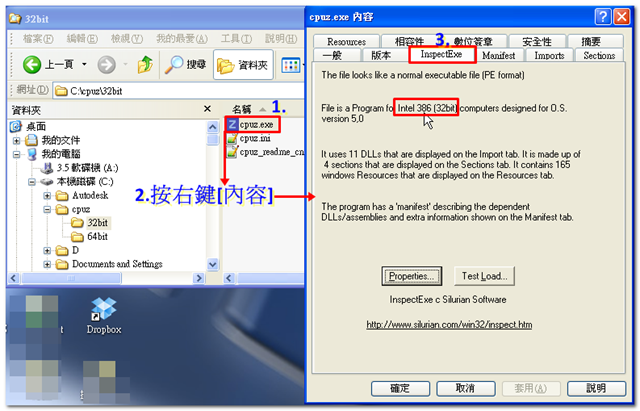
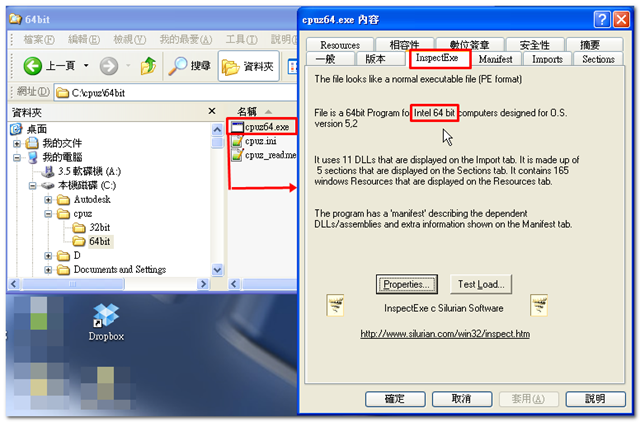
開啟檔案總管,對著程式按右鍵『內容』,即可看到
以下以cpuz這套軟體(分別下載了32bit,64bit)為例:

請先 登入 以發表留言。